mum-discord-bot
Mum - Discord Bot
Mum is a Discord bot designed to handle managing voice channels using semi-private lobbies that are created when needed and deleted when they are not.
Server Setup
Before inviting Mum to your server, be sure to create a voice channel named Create New Lobby.
Once the above has been created, give Mum a call!
The Lobby System
Mum manages voice channels by creating what is referred to as a ‘Lobby’. A Lobby is automatically created every time someone joins the Create New Lobby voice channel. This new Lobby will be named after the user who created it, for example, drewburr's Lobby. Once created, the user will be automatically transferred into thier Libby’s voice channel.
In Discord terms, a Lobby is a category that contains both a voice channel and a text channel. Each channel is aptly named voice chat and text-chat, respectively.
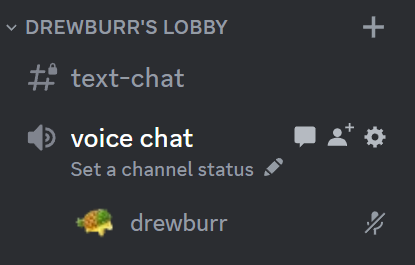
A Lobby is intended to be a semi-private, dedicated space for an activity. To support this, the text-chat is created as a private channel, so it wil be invisible. Once a user joins the Lobby’s voice chat, they will receive permissions to view the channel.
To help support administration, several steps are taken to ensure control over Lobby settings. The category and voice channel permissions are based on the permissions surrounding the Create New Lobby voice channel. For text chat, only the view channel permission is managed by the bot. All other text channel permissions will follow the category and server permissions.
Limitations
A Lobby is considered a ‘Lobby’ when the category name ends with, well, Lobby. This is not case-sensitive, so names like my lobby and another LoBbY are both valid Lobby names. Due to this, it is critical that lobbies are not manually renamed, and no existing category names end in ‘lobby’, otherwise Mum will delete it!
Testing Changes
Local testing requires Docker to be installed.
To support consistent testing and local development, test.sh has been provided.
Before executing, first create .env in the root of the repository. This should include the following data:
DISCORD_TOKEN="your-token-here"
CONTROLLER_GUILD_ID="guild-id"
CONTROLLER_CHANNEL_ID="log-channel-id"
To execute, run the following command. This will build and run the bot using your local files.
./test.sh
To exit, use CTRL+C. After exiting, the container will automatically be deleted.